
Business Central implementations either transform your operations or become expensive lessons in what not to do. There’s rarely a middle ground.
The companies that get it right see faster financial reporting, streamlined processes, and real-time visibility that drives decisions.
The ones that don’t? They’re stuck with systems nobody wants to use and ROI that never shows up.
Our Dynamics 365 Business Central implementation guide shows you how to land in the first group through proven planning and execution strategies.
Let’s get started!
What is Microsoft Dynamics 365 Business Central?
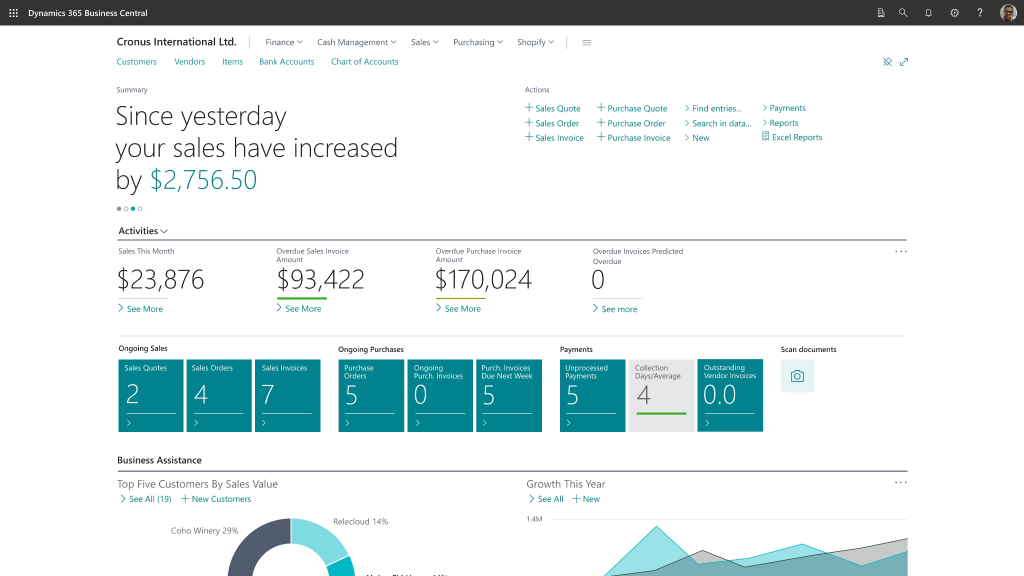
via Microsoft
Microsoft Dynamics 365 Business Central is a comprehensive cloud-based ERP solution that brings all your business operations under one roof.
Consider it your business command center. When your sales team closes a deal, your inventory automatically updates, the finance team sees the instant revenue impact, and your operations team knows exactly what to ship and when.
What It Offers
Business Central covers these essential functions:
- Financial Management: Close your books in days with automated bank reconciliation and multi-currency support.
- Inventory and Warehouse: Get complete visibility from purchase orders to shipping, with automated reorder points and stock optimization.
- Supply Chain: Streamline vendor management and procurement processes to reduce costs and improve delivery times.
- Project Management: Track time, resources, and profitability across jobs with built-in tools for resource allocation.
- Sales and CRM: Manage your entire sales pipeline and customer relationships in one place.
- Purchase Management: Negotiate better deals with vendor performance analytics and automated approval workflows.
Who It’s Built For
Business Central (BC) works best for small to mid-market companies that have outgrown their current systems. If you’re struggling with QuickBooks limitations, dealing with multiple disconnected apps, or trying to modernize from legacy ERPs like NAV, Dynamics 365 Business Central implementation could be your solution.
It’s particularly valuable for growing companies that need real-time visibility across departments, manufacturers managing complex inventory, and service businesses tracking projects and resources.
Choosing the Right Deployment Model
Your Dynamics 365 Business Central implementation strategy starts with a critical choice: cloud or on-premise deployment. This decision affects costs, scalability, and the time it takes to get up and running.
Cloud vs. On-Premise: What’s the Best Fit?
Cloud deployment gets you live faster with predictable monthly costs and automatic updates. It’s perfect for companies that want to focus on business growth rather than server management.
Microsoft handles infrastructure, security patches, and system maintenance.
On the other hand, on-premise deployment gives you complete control over data and customizations.
Why Most Businesses Choose the Cloud (and When You Shouldn’t)
Microsoft’s roadmap is cloud-first. New features hit cloud versions first through Wave 1 and Wave 2 updates twice yearly. Cloud systems update automatically during off-hours, keeping you current without IT overhead.
Skip cloud only if you’re in highly regulated industries with strict data residency rules or have complex integrations requiring complete infrastructure control. Otherwise, you’re fighting Microsoft’s strategic direction.
Pre-Implementation Phase: Planning and Readiness
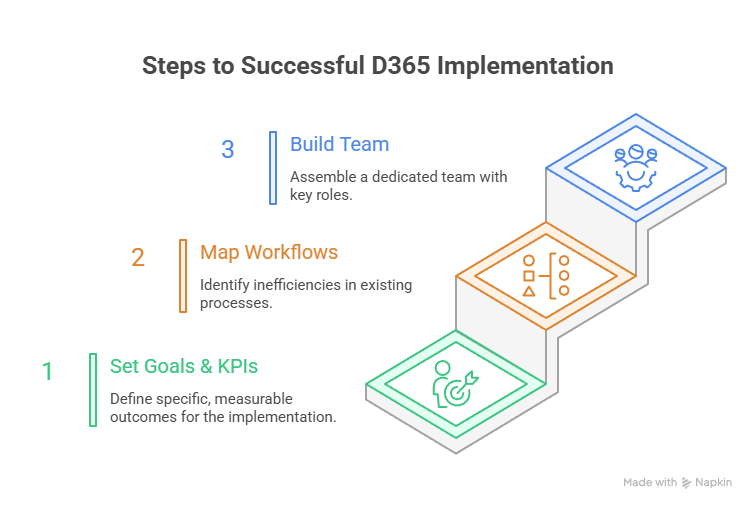
Smart D365 Business Central implementation begins months before you touch the software. Poor planning here creates expensive problems later. Here’s where to start:
Set Your Business Goals and KPIs
Start with brutal honesty about your current pain points. Are you spending 15 days closing books when it should take five? Is your inventory accuracy at 75% when you need it to be at 95%? Do your salespeople waste hours entering the same data into three different systems?
Define specific, measurable outcomes:
- Financial efficiency: Reduce month-end close time by 60%
- Operational accuracy: Achieve 95%+ inventory accuracy
- Process automation: Eliminate 80% of manual data entry
- Decision speed: Get real-time visibility into project profitability
- Compliance readiness: Automate regulatory reporting requirements
Map Existing Workflows and Spot Inefficiencies
Shadow your people for a full week to understand their workflows. Document every workaround, every Excel spreadsheet, every time someone prints a report just to type the data somewhere else.
Look for these red flags:
- Double data entry between systems
- Manual reconciliation processes that take hours
- Information silos where departments can’t see each other’s data
- Approval bottlenecks where everything waits for one person
- Reporting delays where decisions wait for data compilation
Build Your Internal and External Implementation Team
Your internal team needs these critical roles:
- Executive Sponsor: Someone with budget authority and political capital to remove roadblocks. This person doesn’t need to know the software, but they need to make decisions quickly when issues arise.
- Project Manager: Your day-to-day point person who coordinates between departments, tracks progress, and keeps everyone accountable. This role needs 20+ hours per week during active phases.
- Subject Matter Experts: One person from each affected department who knows the current processes intimately and can make decisions about future workflows.
- IT Lead: Someone who understands your current technical environment, integration requirements, and can work with external partners on technical decisions.
For external partners, choose Business Central implementation specialists like NEX Softsys who bring both technical expertise and industry knowledge to guide your Business Central implementation process.
To speed up the Dynamics 365 Business Central implementation process, start with a proven checklist. It lays out every must-do step in the right order, so you can focus on decisions and execution instead of figuring out what to tackle next.
Business Central Implementation Phases
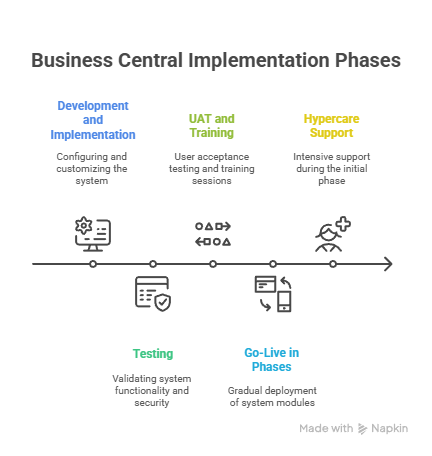
Business Central is rolled out in phases, taking it from planning to go-live. Here’s how those phases typically unfold.
Phase 1: Development and Implementation
This is where your Business Central system comes to life.
System Configuration
Configure Business Central modules to match your specific workflows. This involves deep customization of how each module behaves within your business context:
- Financial setup: Chart of accounts structure, dimension codes for departmental reporting, posting groups for automated categorization, and approval workflows for expense management.
- Security configuration: Role-based access controls that match your organizational hierarchy, approval limits that reflect authority levels, and permission sets that balance security with usability.
- Module customization: Sales order processing with your specific approval chains, purchasing workflows that match vendor relationships, and inventory management with your location and bin structures.
- Automation rules: Workflow approvals that eliminate bottlenecks, automatic posting routines that reduce manual entry, and exception handling for special cases.
Build the customizations that make Business Central work for your specific industry and business model. This can look like:
- Custom reports and dashboards: KPI dashboards that match executive reporting needs, operational reports that support daily decision-making, and compliance reports for regulatory requirements.
- Specialized workflows: Multi-stage approval processes for large purchases, automated notification systems for exception handling, and custom document routing based on business rules.
- Industry add-ons: Specialized solutions like jewelry manufacturing tracking, EPC project management tools, or quality control systems that standard Business Central doesn’t provide.
- Integration development: Real-time data synchronization with CRM systems, e-commerce platform connections for order processing, and manufacturing system integrations for production planning.
Data migration is where timelines often derail. At NEX Softsys, we start data profiling during the design phase, running mock migrations early in the process so you don’t get hit with nasty surprises days before go-live.
Third-Party Integrations
Ensure uninterrupted Business Central integration within your existing ecosystem :
- Microsoft ecosystem integrations: Power Apps for custom portals, Power BI for advanced analytics, Power Automate for process automation, and Teams for collaboration workflows.
- External system connections: Salesforce CRM synchronization, Shopify e-commerce integration, WhatsApp messaging for customer communication, banking system for automated reconciliation, and Shopify migration services..
- Legacy system bridges: SAP data migration pathways, QuickBooks historical data preservation, and custom API connections for proprietary systems.
Phase 2: Testing
Testing validates that your configured system works in real-world scenarios with real data volumes. This phase prevents expensive post-go-live surprises and builds user confidence before launch.
It comprises:
- System Testing: Thoroughly test every configuration and customization before users touch it. This includes unit testing of individual modules and integration testing to ensure everything works together.
- Load Testing: Simulate your transaction volumes to identify performance bottlenecks before go-live. You should ideally test during peak periods like month-end closing or busy season order processing.
- Security Testing: Verify that role-based permissions work correctly and sensitive data remains protected. Remember to test approval workflows under various scenarios to ensure proper controls.
Phase 3: UAT and Training
Your subject matter experts test real business scenarios with actual data to validate that Business Central truly supports your operations.
You can try:
- End-to-end process testing from quote to cash, procure to pay
- Exception scenario testing for returns, adjustments, and error handling
- Performance validation under realistic transaction volumes
- Integration testing with all connected systems
Training Implementation
Follow a “train the trainer” approach so each group learns exactly what they need to work confidently in Business Central:
Superuser intensive training
- 2-3 days per module for internal champions
- Advanced configuration training for ongoing maintenance
- Troubleshooting procedures for common issues
End-user training
- Role-specific workflow training (4-6 hours per user)
- Hands-on practice with real scenarios
- Quick reference guides for daily tasks
- Common error resolution procedures
Management training
- Executive dashboard navigation
- KPI interpretation and analysis
- System performance monitoring
- Strategic reporting capabilities
Support team preparation
- Internal help desk procedures
- Escalation protocols for complex issues
- User account management training
- Ongoing training delivery capabilities
Phase 4: Go-Live in Phases
Don’t flip a switch and hope for the best. Strategic phasing enables you to validate each component before introducing additional complexities.
Here’s what this may look like:
- Phase 1 – Core Financial: General ledger, accounts payable/receivable, bank reconciliation, and basic reporting to establish financial foundation.
- Phase 2 – Operations: Full inventory management, purchasing workflows, sales order processing, and customer/vendor master data.
- Phase 3 – Advanced Features: Manufacturing modules, project management, advanced reporting, and specialized industry add-ons.
- Phase 4 – Integration Completion: All third-party system connections, advanced automation workflows, and mobile/portal access.
Move from spreadsheets and disconnected systems to a predictable, data-driven way of working.
Our team of Dynamics 365 Business Central consultants handles end-to-end implementation so finance, supply chain, and operations feel aligned from day one.
Hypercare Support
The first 30 days are critical. Providing intensive, hands-on support during this time helps resolve issues quickly and builds user confidence:
- Conduct daily check-ins: Hold morning standup meetings with key users, review issues in the afternoon, validate system performance in the evening, and confirm weekend readiness.
- Resolve issues in real time: Provide a dedicated support hotline for critical problems, offer on-site help for complex cases, use remote screen sharing for quick fixes, and follow clear escalation procedures for urgent matters.
- Monitor performance: Track system response times, measure user adoption, monitor error rates, and analyze workflow efficiency.
- Support user adoption: Deliver extra training for struggling users, refine processes based on feedback, update documentation for new procedures, and celebrate early wins to maintain momentum.
From the NEX Project Desk: Use Business Central’s telemetry and performance metrics early in the pilot stage. If certain pages or reports load slowly, address them before the full rollout to prevent user frustration.
How Long Does a Business Central Implementation Take?
Small businesses with straightforward processes need 3-4 months for basic implementations.
In contrast, mid-market companies with multiple locations, complex workflows, or significant customizations should plan 6-9 months. Large enterprises with extensive integrations might need 12+ months.
These timelines assume dedicated internal resources and support from implementation partners. Part-time attention from your team will stretch timelines significantly and increase costs.
Common Pitfalls to Avoid in the Dynamics 365 Business Central Implementation Process
The difference between implementation success and disaster often comes down to avoiding these critical mistakes:
- Rushing discovery and requirements gathering kills more implementations than technical problems. When companies skip the deep dive into current processes, they end up recreating broken workflows in expensive new software.
- Choosing implementation partners based solely on price creates a false economy. That bargain-basement consultant who quotes half the market rate usually delivers implementations that cost triple to fix.
- Neglecting change management and user training ensures your expensive new system becomes digital shelf-ware. When users don’t understand why processes are changing or how the new system benefits them personally, they’ll find creative ways to avoid using it.
What to Look for in a Dynamics 365 Business Central Implementation Partner?
Finding the right Dynamics 365 Business Central Implementation partner takes careful consideration. The choices you make here set the stage for how smoothly your rollout will go.
Read on to understand what to look for.
Industry Experience and Process Understanding
Choose partners who understand your specific industry challenges, not just the software. Generic consultants know features but miss why certain processes matter in your business. Look for proven experience in your sector with references from similar companies.
Microsoft Certification and Support Capacity
Verify Microsoft-certified consultants with real Business Central implementation experience. Assess their support capacity: Can they effectively manage your project alongside existing commitments? Do they have backup resources if key people leave mid-project?
If your team needs custom apps, integrations, or AL extensions, our developers plug in fast.
We architect clean code, follow Microsoft standards, and keep performance sharp so your Business Central build scales instead of becoming technical debt.
Post-Go-Live Support and Governance
Implementation doesn’t end at go-live.
Your partner should offer ongoing support, regular system updates, and help implement new features. They should also help maintain data governance and optimize system performance as your business grows.
Why Work With NEX Softsys for Your Business Central Rollout?
NEX Softsys’s Microsoft-certified consultants bring over 15 years of hands-on experience. Our industry-specific add-ons and proven methodology help you get the most from your D365 Business Central investment.
We focus on clean data migration, efficient workflows across departments, and structured training that ensures your team can use the system confidently from day one.
We also help you turn data into insights, with accurate reporting and dashboards that let you make faster, smarter decisions. Our Dynamics 365 Business Central Implementation Services keep you in control at every stage to ensure your new setup continues to deliver business value.
Here’s what one client said: “We are very glad we partnered with NEX for 365 Business Central implementation consulting. Their team understood our business needs and provided the perfect Business Central solutions to keep our remote locations connected and aligned with business updates.”
A successful Business Central rollout comes from careful planning, clear workflows, and effective training. This Dynamics 365 Business Central implementation guide shows how to avoid delays, prevent costly errors, and ensure your team adopts the system confidently.
Take the next step and book a consultation to see how we can make your Business Central implementation strategy smooth, efficient, and aligned with your goals.
FAQs
1. How much does Dynamics 365 Business Central implementation cost?
The cost depends on your Business Central implementation strategy, number of users, modules required, and whether you choose cloud or on-premise deployment. For small to mid-sized businesses, cloud implementations often start around $8,000-$15,000, while larger or more complex on-premise setups can exceed $50,000.
These figures typically include licensing, configuration, and basic training but may increase with custom development, integrations, or extended support.
2. What are the modules in Dynamics 365 Business Central?
Business Central includes modules for finance, sales, purchasing, inventory, manufacturing, project management, and service management. You can select the modules that align with your business needs and implementation strategy.
3. What’s the role of a Dynamics 365 Business Central implementation partner?
An implementation partner guides you through the entire Business Central implementation process. They help tailor the system to your workflows, reduce risks, and ensure you get the most from your investment.






 Java
Java ASP.NET
 Python
 Big Data
 Data Warehouse
 Magento
 Software Outsourcing
 Software Testing
 Dynamics CRM
 Dynamics 365
 Dynamics FO
 Dynamics AX
 AI
AI